
The images displayed below are a combination of phishing and real emails. Spot the phish! Click on the images to zoom in.
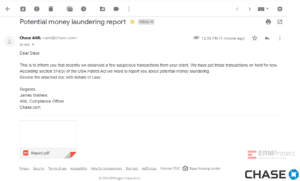
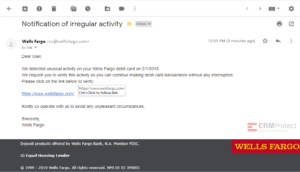
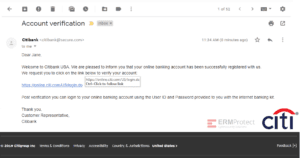
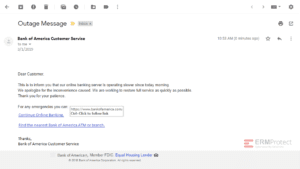
Spoiler Alert: Answers are below.
Answer: All the emails are phishes! Let’s take a look below…
Image 1 details: First things first: if a message isn’t personalized with your name or a specific identifier such as a verified (partial) account number, be suspicious. Greetings like “Dear Customer” suggest the sender is trying to catch anyone who happens to receive the email – and has no idea whether the recipient really has a Bank of America account. Also, the footer of the email says ‘Bank of American’ and the copyright says 2018 while the email was sent in 2019.

Image 2 details: Check out the sender email ID. The domain should be Citi’s domain. The hacker sent the email from @secure.com to try to make it look real and secure. It’s a clear phish!

Image 3 details: Here comes another malicious hyperlink! The sender was clever enough to spell Wells Fargo correctly in the URL but if you hover over the hyperlink, you’ll see the spoofed URL ‘welsfargo.com.’ Always remember to mouse-over links to see where the sender is really trying to take you.

Image 4 details: This is a clear phish! The chances of a reputable brand like Chase sending out grammatically incorrect emails are pretty slim. Although the attachment appears legit, it contains malicious code.
